Build duplicate-safe form submission and CSV export
Application background
A community event needs a page where volunteers enter their name, phone number and a note. Pressing Submit should create one registration, and organizers should be able to download the registrations as a spreadsheet.
Mobile connections make the outcome less obvious. A volunteer may tap twice or retry because they never saw confirmation. The notes also come from users, so a spreadsheet should not interpret something like =1+1 as a formula when the organizer opens it.
Example walkthrough
| Action | Expected behavior |
|---|---|
| A volunteer submits the form | Save one registration and show confirmation. |
| The same submission is sent again with the same identity | Return the existing result instead of adding another person. |
An organizer exports a note beginning with = |
Keep the note as text in the spreadsheet. |
An idempotency key is an identity for one intended submission. Reusing that key lets the server recognize a repeat, even when the original response did not reach the browser.
Your assignment
Deliver: Build the volunteer form, server validation and saved registrations. Recognize repeated submissions and provide a CSV export that keeps user-entered notes as text.
Required behavior: The form has labeled accessible fields, server-side validation and a stable submission request ID. Store original text faithfully. Provide a deliberate spreadsheet-safe export without changing the stored source values.
The required first milestone is a working local implementation of the behavior above. The numbered implementation steps define the scope. The cloud architecture is a later extension, not something the starter has already provisioned.
Get the code and run the supplied example
The code is in the public junior-to-staff repository. Install Git and Python 3.12+. No AWS account or Python packages are required for this first run. If you already have a checkout, use it and skip cloning.
git clone https://github.com/Soulful-Iris/junior-to-staff.git
cd junior-to-staff
python3 examples/architecture-starts/a_public_form.py
Supplied file: examples/architecture-starts/a_public_form.py. You can also read or download the source here (download file, source below).
Read the supplied code · a_public_form.py
"""Local mechanism demonstration for a-public-form. No AWS resources are created."""
import csv,io
rows=[['Ana','00123','=1+1\nPlease call after six']]
def spreadsheet_text(value):
    return "'"+value if value.lstrip().startswith(('=','+','-','@')) else value
out=io.StringIO(newline=''); writer=csv.writer(out)
writer.writerow(['name','phone','notes'])
for row in rows: writer.writerow([row[0],"'"+row[1],spreadsheet_text(row[2])])
print(out.getvalue()); print('Stored originals:',rows)
This program is a mechanism demonstration: it runs the small scenario in one process and prints the result. It is not an HTTP service, a complete application, or an AWS deployment. A successful run demonstrates this mechanism only. It does not establish the workload or failure guarantees of the application you will build.
Example output from the supplied run:
Generated IDs and timestamps may differ. Compare the state transitions and outcomes.
name,phone,notes
Ana,'00123,"'=1+1
Please call after six"

… (more output follows)
Set up your implementation workspace
Create work/a-public-form/ in your checkout (or use a separate repository). Copy the supplied mechanism into that directory as mechanism.py, then extract its state transitions into functions you can call from your implementation. The record and module names below describe what you must implement. They are not a promise that files with those names already exist. Keep a README.md beside your implementation with its exact run commands and observed results.
Local components and state to implement
This table names the records, interfaces or decision inputs for your deliverable. Unless a name is explicitly linked to supplied source above, it is something you create. Implement the local state transitions first, then connect the HTTP, storage or worker boundaries required by the steps.
| Record / module | Key or interface | Responsibility |
|---|---|---|
| submissions | submission_id,request_id,payload_hash | One logical form submission and replay result. |
| contact_fields | name,phone,notes | Validated original text, not spreadsheet formulas or numeric phone data. |
| export_view | submission_id,escaped_cells | Explicit export transformation with a documented text policy. |
Implement the assignment
1. Build the usable form
Add explicit labels, input hints, keyboard-accessible errors and a submit state that preserves entered values. Validate again on the server. Return field-specific errors without clearing the entire form. Allow a user to correct only the invalid field.
2. Commit one submission
Generate a stable client request ID per attempted form submission and store its payload hash with the result. Exact replay returns the same registration. Reusing the ID with changed data returns a conflict so a failed response cannot silently replace another submission.
3. Store and export separately
Keep phone and notes as text, including leading zeros and newlines. Use a real CSV writer for quoting. Offer an explicitly spreadsheet-safe view that neutralizes formula-leading text and preserves phone representation for the chosen target. Document that CSV cannot carry universal cell typing across every spreadsheet importer.
4. Operate a public endpoint
Add body-size and rate limits, CSRF protection where cookie authentication is involved, and bounded abuse controls. Keep organizer access authenticated and auditable. Show a success receipt only after durable storage, not merely after disabling the button.
Demonstrate the completed local result
| Action | Expected visible result |
|---|---|
| Run the starting program | The export preserves text intent and quotes multiline notes. Stored originals remain unchanged. |
| Double-submit the same request ID | One registration and the same receipt return. |
| Submit one invalid field | The form keeps the other entered values and points to the correction. |
Handoff: In your implementation README, include the start command, one successful operation, the failure case above and the resulting stored state or decision. State which dependencies are simulated. Someone with a fresh checkout should be able to reproduce this without your chat history.
Workload assumptions and capacity decisions
These are constructed exercise assumptions. The stated workload is a design target. The local demonstration does not establish that throughput. Use the estimation constants to check units before choosing capacity.
| Input or objective | Calculation / consequence |
|---|---|
| 500 registrations/day. 20 submissions/s event-opening burst | Small storage volume but burst admission and duplicate handling still matter. |
| Phone value 00123 | Treat it as text. Numeric conversion loses meaningful leading zeros. |
| Notes up to 2,000 characters | Bound input size and preserve intentional newlines with correct CSV quoting. |
Map the local implementation to AWS
Deployment status: local only. Running the supplied command creates no AWS resources and configures no cloud connections. The diagram is a proposed deployment of the completed application. Each box needs either a deployed runtime, a provisioned service or an explicitly external dependency.
Read the diagram by following the arrows from the entry point: application code accepts the request or event, the state owner commits it, and any worker produces the later result. The table ties those roles to code and adapter work. Multiple boxes do not imply multiple Python files already exist.
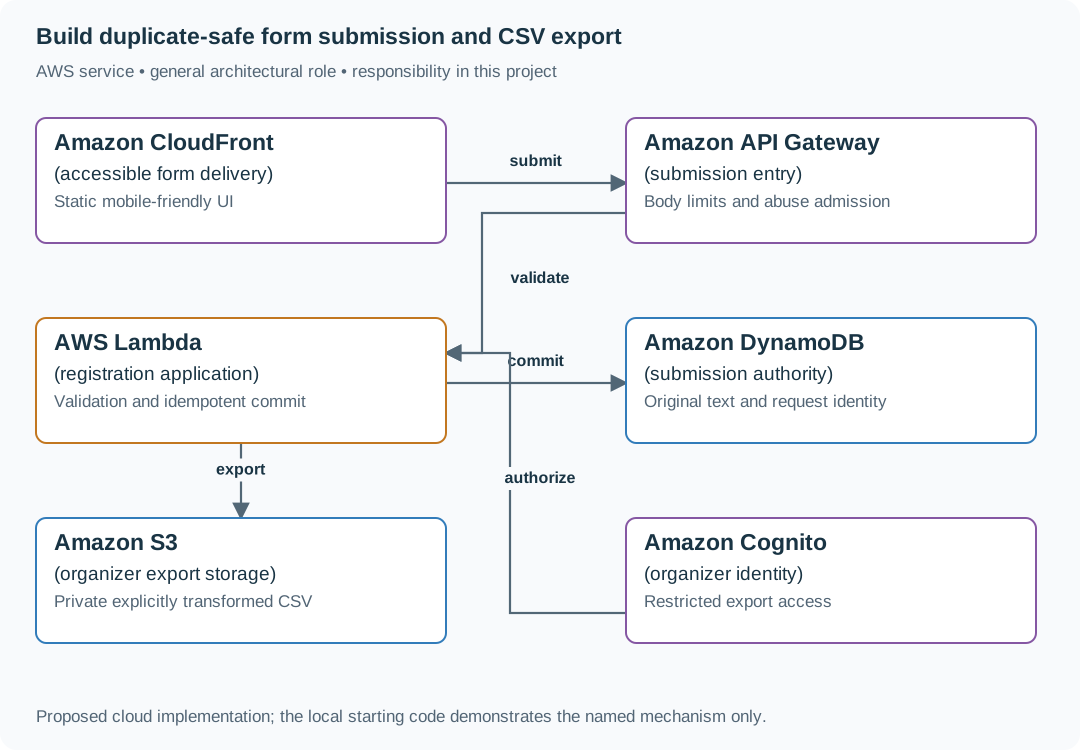
The static UI handles usability. Lambda enforces validation and duplicate identity. Export formatting is a separate transformation so spreadsheet safety does not corrupt the original submission.
| Local responsibility | Cloud destination and role | Implementation still required |
|---|---|---|
| Local static/media delivery path | Amazon CloudFront: accessible form delivery | Configure an origin, cache policy and private-content access. Distinguish cached bytes from current authorization. |
| Local HTTP boundary or the endpoint you will add | Amazon API Gateway: submission entry | Create routes and an integration. Translate requests and responses and configure identity validation. |
| Python operation or worker function | AWS Lambda: registration application | Write a Lambda event adapter, package its dependencies and give its role only the required resource actions. |
| Local dictionary, SQLite records or state model | Amazon DynamoDB: submission authority | Design partition/sort keys and write a storage adapter with conditional updates or transactions. Python state and SQL are not uploaded as a database. |
| Local file, object fixture or exported payload | Amazon S3: organizer export storage | Implement upload/download and metadata adapters, scoped access, object naming, retention and incomplete-upload cleanup. |
| Local fixture identity or caller supplied to the operation | Amazon Cognito: organizer identity | Configure an identity provider and validate tokens. Retain resource ownership checks in application code. |
Provision resources, then connect the application
| Resource or boundary | Initial configuration and reason |
|---|---|
| Public endpoint | Limit payload bytes and request rate. Keep abuse decisions separate from valid-field errors. |
| Storage | Restrict organizer reads and export generation. Avoid logging contact data. |
| Exports | Private bucket, short-lived authorized downloads and retention appropriate to the event. |
Use one disposable AWS environment for the cloud exercise. Put the named resources in infra/template.yaml or your existing IaC tool, pass resource IDs through configuration, and scope each runtime role to its own tables, buckets and queues. The diagram is a design to implement. It is not a claim that these resources have been deployed. Record the commands you used to deploy and remove the exercise resources.
For concrete provisioning commands, configuration wiring and cleanup, use the AWS foundation guide. It includes a deployable table/queue/object-storage foundation and explains which application and service adapters you still implement.
A provisioned queue or table does not make the local program use it. Configure resource IDs in the deployed runtime, replace the local adapter, and replay the same successful and failing operation against that runtime. Record the deployed commit and observable result, then remove the disposable resources using your infrastructure tool.
Extend the design after the baseline works
Add a second export for a machine consumer that needs exact original strings. Name the two export contracts clearly and avoid making spreadsheet-oriented escaping part of the canonical data.
Follow-up scenarios and worked designs
Follow-up 1 · A school shares one IP
Two hundred legitimate users submit behind the same NAT. What does per-IP throttling do?
Worked design and implementation
It can block the school. Combine coarse abuse limits with fairer account/session or challenge policies where possible, and measure legitimate rejection. Managed throttles reduce load but are not exact hard spending caps.
Compare two populations. Two hundred pupils submit from one school gateway, while an attacker rotates addresses. A strict one-user-per-IP assumption both harms the school and misses the attacker. Keep coarse per-IP protection for infrastructure, then apply verified account or session limits where available. Anonymous sessions can be recreated, so document their weaker identity guarantee.
Deliver an admission table for a school user, a repeated session and a new anonymous session. Include the challenge or retry message seen by a legitimate rejected user. Measure total accepted work and legitimate rejection separately. Do not describe a managed throttle as an exact billing ceiling.
Follow-up 2 · The export contains private data
A download link is forwarded to another person. What authorizes access?
Worked design and implementation
Check owner authorization before issuing a short-lived private object URL, or authorize every delivery for stricter revocation. Record that a signed URL remains usable until expiry unless an additional revocation mechanism exists.
Choose the download contract. Put exports in private object storage and store owner, generation, status and expiry in the application database. A download endpoint authenticates the caller and checks current ownership. It can issue a short-lived signed URL if the product accepts its remaining usable lifetime, or proxy/authorize every delivery for stricter revocation.
Create Alice's export and send its application download URL to Bob. Bob is denied. If you chose signed URLs, show that forwarding the already issued bearer URL is a different case and state its expiry. Deliver both outcomes rather than claiming an initial owner check prevents all later sharing.
Revised flow. These are proposed components to implement, not extra services started by the supplied demo.
