Deploy from main and roll back compatible artifacts
Application background
A reading-list team wants a change pushed to main to become available on its website automatically. A build turns that source revision into the files or container that will run. Deployment installs that exact result in the serving environment.
If a change goes wrong, the team needs to restore a known earlier version. Replacing the code alone may not work if the newer version has already written data the older version cannot understand.
Example walkthrough
| Action | Expected behavior |
|---|---|
| Commit A reaches main | Build and deploy an artifact identified as A. |
| Commit B deploys but its feature is problematic | Turn off the feature or restore a known compatible artifact. |
| B wrote a new data format | Check whether A can still read it before relying on rollback. |
An artifact is the built output you deploy. Keep source revision, artifact identity, feature exposure and data compatibility explicit so restoring service is a concrete operation.
Your assignment
Deliver: Build automatic deployment from main and demonstrate restoring a known earlier artifact. Include the data compatibility needed for that rollback to work.
Required behavior: A push to main triggers build and deployment without a newly added test or approval gate. Record the deployed commit/artifact. Feature exposure and data compatibility are explicit application concerns, and rollback names the exact artifact/configuration it restores.
The required first milestone is a working local implementation of the behavior above. The numbered implementation steps define the scope. The cloud architecture is a later extension, not something the starter has already provisioned.
Get the code and run the supplied example
The code is in the public junior-to-staff repository. Install Git and Python 3.12+. No AWS account or Python packages are required for this first run. If you already have a checkout, use it and skip cloning.
git clone https://github.com/Soulful-Iris/junior-to-staff.git
cd junior-to-staff
python3 examples/architecture-starts/twenty_deploys_a_day.py
Supplied file: examples/architecture-starts/twenty_deploys_a_day.py. You can also read or download the source here (download file, source below).
Read the supplied code · twenty_deploys_a_day.py
"""Local mechanism demonstration for twenty-deploys-a-day. No AWS resources are created."""
releases={'v1':{'reads':{'title','url'}},'v2':{'reads':{'title','url','tagObjects'}}}
record={'title':'Guide','url':'https://example.invalid','tagObjects':[]}
active='v2'; flag=False
print('Deployed:',active,'feature enabled:',flag)
active='v1'
print('Rolled back:',active,'can read required fields:',releases[active]['reads'].issubset(record))
del record['title']
print('After destructive schema change:',releases[active]['reads'].issubset(record))
This program is a mechanism demonstration: it runs the small scenario in one process and prints the result. It is not an HTTP service, a complete application, or an AWS deployment. A successful run demonstrates this mechanism only. It does not establish the workload or failure guarantees of the application you will build.
Example output from the supplied run:
Generated IDs and timestamps may differ. Compare the state transitions and outcomes.
Deployed: v2 feature enabled: False
Rolled back: v1 can read required fields: True
After destructive schema change: False
Run the application you will extend
The reading-list API setup guide gives you a real local HTTP server, SQLite database, save/list/edit requests and controlled title success/timeout behavior. Start it in one terminal and send the documented curl requests from another. Read that setup before following the implementation steps below. The demo above isolates this lesson's mechanism. The server is where you integrate it.
For a first run, start this in terminal 1 from the repository root:
python3 examples/reading-list-starter/app.py --db /tmp/reading-list.sqlite3
In terminal 2, save one bookmark with a controlled title timeout:
curl -i http://127.0.0.1:8080/bookmarks \
  -H 'X-Demo-User: alice' -H 'Content-Type: application/json' \
  -d '{"url":"https://example.com/docs","title_mode":"timeout"}'
Expect 201 Created, a bookmark id and title_status: "timeout". The URL is persisted despite the title failure. This is the supplied baseline. The assignment adds the behavior described above. The lookup is a fixture, so no external website is contacted. For members Bob or Ben in a scenario, use the starter's second demo identity bob. Alice or Ana corresponds to alice.
Work in your own branch or copy examples/reading-list-starter/ to work/twenty-deploys-a-day/. app.py exists in that directory. Add the modules named below there as you separate HTTP, storage and background work. The server has demo membership, not production authentication.
Local components and state to implement
This table names the records, interfaces or decision inputs for your deliverable. Unless a name is explicitly linked to supplied source above, it is something you create. Implement the local state transitions first, then connect the HTTP, storage or worker boundaries required by the steps.
| Record / module | Key or interface | Responsibility |
|---|---|---|
| release_manifest | commit,artifact_digest,config_version | Immutable identity of what is running. |
| active_release | environment,manifest_pointer | Atomic deployment switch and prior version. |
| compatibility_record | schema_version,supported_readers | Documents the first irreversible data boundary. |
Implement the assignment
1. Make main the deployment trigger
Build from the pushed commit and publish that immutable artifact. Record the commit in a version endpoint or release manifest. Avoid introducing unrelated checks, manual approvals or scheduled jobs into this guide’s publishing path.
2. Separate deployment from exposure
Keep a new optional UI path behind a versioned flag while both code versions understand stored data. Deploy the code first, then adjust exposure as a product operation. Disabling a flag stops new entry. It does not cancel work already running or undo external effects.
3. Practice one concrete rollback
Keep the prior artifact and configuration. Switch back using a documented command and inspect the actual version endpoint plus a create/read action. Measure elapsed recovery time. Restore compatible code without rebuilding a supposedly identical older artifact from changing dependencies.
4. Handle the data boundary honestly
Expand schema before using new fields, retain old readers/writers during the support window and remove old fields only after retirement. Once new data cannot be represented by old code, use a compatibility adapter or forward repair. An old container image cannot recreate dropped data.
Demonstrate the completed local result
| Action | Expected visible result |
|---|---|
| Run the starting program | Code rollback works with compatible fields. Deleting title demonstrates the irreversible boundary. |
| Push a harmless visible change | The deployed commit and page/application output match the pushed artifact. |
| Disable the feature | New exposure stops while the deployed version remains unchanged. |
Handoff: In your implementation README, include the start command, one successful operation, the failure case above and the resulting stored state or decision. State which dependencies are simulated. Someone with a fresh checkout should be able to reproduce this without your chat history.
Workload assumptions and capacity decisions
These are constructed exercise assumptions. The stated workload is a design target. The local demonstration does not establish that throughput. Use the estimation constants to check units before choosing capacity.
| Input or objective | Calculation / consequence |
|---|---|
| Twenty deployments/day | Artifact identity and one reliable rollback action matter more than a long manual release checklist. |
| 1% then 10% feature exposure | Record actual cohort behavior. Code can already be deployed while the feature remains off. |
| Two supported code versions during rollout | Schema expansion must remain readable by both until the old version is retired. |
Map the local implementation to AWS
Deployment status: local only. Running the supplied command creates no AWS resources and configures no cloud connections. The diagram is a proposed deployment of the completed application. Each box needs either a deployed runtime, a provisioned service or an explicitly external dependency.
Read the diagram by following the arrows from the entry point: application code accepts the request or event, the state owner commits it, and any worker produces the later result. The table ties those roles to code and adapter work. Multiple boxes do not imply multiple Python files already exist.
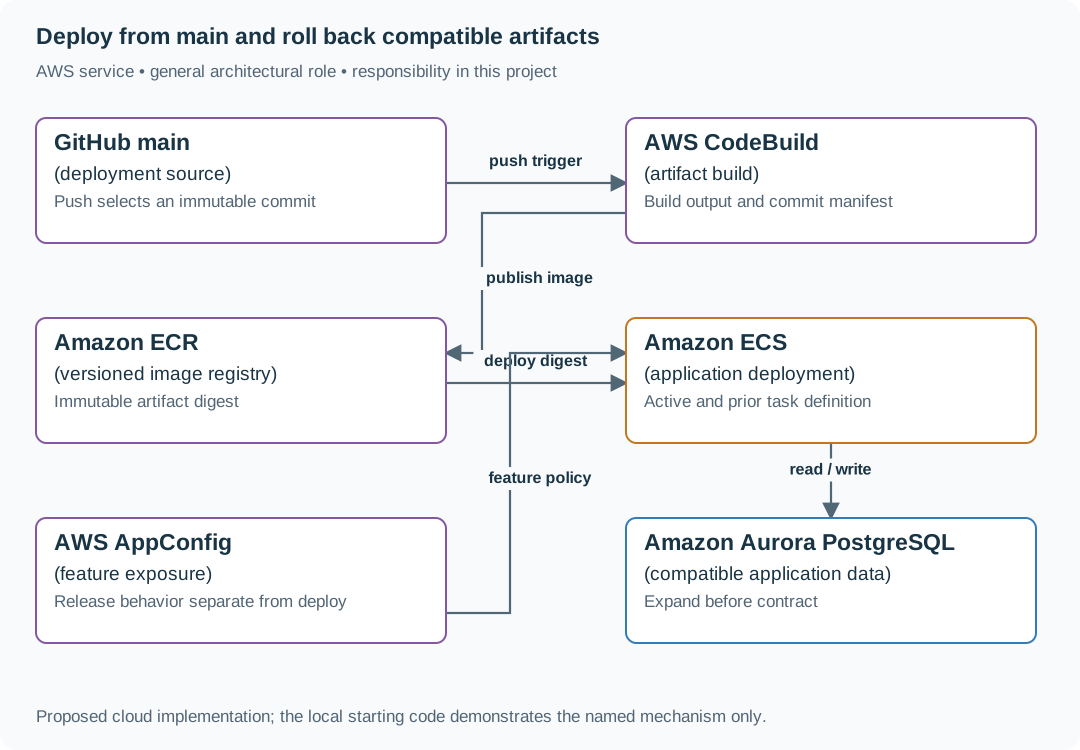
The diagram is an AWS application deployment option. This guide’s existing push-to-main publishing remains intact. Building the site/application is necessary to produce deployable output. Additional tests or approval gates are not added here.
| Local responsibility | Cloud destination and role | Implementation still required |
|---|---|---|
| Local source revision | GitHub main: deployment source | Connect the chosen repository push event to artifact building and deployment. Identify the deployed commit. |
| Local build/package command | AWS CodeBuild: artifact build | Define an artifact build and deployment handoff triggered by main. Record the immutable artifact identity. |
| Local application/container artifact | Amazon ECR: versioned image registry | Build and push an image, deploy by digest and retain a known compatible rollback artifact. |
| Application or worker process | Amazon ECS: application deployment | Build a container and task definition. Supply configuration, task roles and graceful shutdown behavior. |
| Local versioned configuration | AWS AppConfig: feature exposure | Publish validated configuration versions and consume them with bounded caching and rollback behavior. |
| Local records and transaction boundary | Amazon Aurora PostgreSQL: compatible application data | Write PostgreSQL schema/migrations and a database adapter. Configure credentials, connection limits and recovery. |
Provision resources, then connect the application
| Resource or boundary | Initial configuration and reason |
|---|---|
| Deployment identity | Scope repository/branch trust and environment permissions. Untrusted code does not receive production credentials. |
| Artifacts | Tag for human readability but deploy by digest. Retain the previous working artifact/configuration. |
| Database | Use compatible expansion and explicit retirement. Keep backup/repair procedures independent of the deployment dashboard. |
Use one disposable AWS environment for the cloud exercise. Put the named resources in infra/template.yaml or your existing IaC tool, pass resource IDs through configuration, and scope each runtime role to its own tables, buckets and queues. The diagram is a design to implement. It is not a claim that these resources have been deployed. Record the commands you used to deploy and remove the exercise resources.
For concrete provisioning commands, configuration wiring and cleanup, use the AWS foundation guide. It includes a deployable table/queue/object-storage foundation and explains which application and service adapters you still implement.
A provisioned queue or table does not make the local program use it. Configure resource IDs in the deployed runtime, replace the local adapter, and replay the same successful and failing operation against that runtime. Record the deployed commit and observable result, then remove the disposable resources using your infrastructure tool.
Extend the design after the baseline works
Worked follow-up: Recover external effects after a code rollback
Restoring yesterday's binary can stop further bad requests, but it cannot recall an email or erase a provider charge. The release needs a repair record as well as a code version.
| Starting design | Changed requirement |
|---|---|
| Rollback restores the previous application artifact. | A failed release has already sent messages or changed an external account. |
Revised architecture. Follow the changed responsibility and failure path below. This is a design to implement. The supplied local example does not provision these components.

What to implement. Record external operation identity, source release and result in durable state. During rollback, stop new affected work and classify existing attempts as confirmed, failed or unknown. Reconcile unknowns with the original provider identity. Any compensating action needs its own authorization and receipt. Keep data schemas readable by the restored code during the rollback window. This extends the sample application's operating design, not this guide's deployment workflow.
Walk through the result. Release B creates three provider operations. Two succeed and one loses its response. Restore A and show that the ledger still lists all three. Query the unknown operation and record its actual outcome. Deliver a served-version transcript alongside a separate repair ledger so nobody mistakes code recovery for business recovery.
An external effect completed before rollback. Define the reconciliation or compensation operation separately. Switching code cannot reverse a sent email or completed payment.