Practice visible states, browser ownership, accessibility and form boundaries
The supplied bookmark editor lets a member search seeded bookmarks and edit a title. It has a real browser, HTTP server, and SQLite database. Use it for the first four exercises. It does not supply sign-in, tags, create, or delete. The fifth exercise uses the separate reading-list API’s create route, and asks you to add the form.
Choose your starting code
Run the bookmark editor, then read browser state ownership. The screenshots below come from that running editor. Empty and error are different states with different next actions.
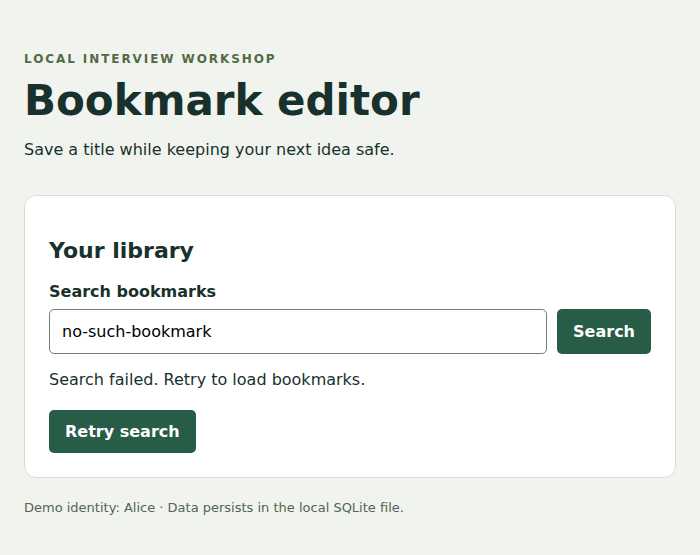
1. Design loading, empty, error and loaded states
A list with no matching records is different from a list that could not be loaded. Rendering both as “No bookmarks” gives the user false information.
Your task. Write the exact message and available action for each state. Make each state reproducible in a local development mode. Preserve an existing useful result while clearly labeling a refresh failure when that is the chosen product behavior.
What to observe. Force an empty search and an unavailable API separately. The first offers query recovery, while the second explains the failed load and offers retry.
Changed requirement. A response arrives after the user changes their query. Add request identity so an old response cannot replace the current state.
Worked mechanism and implementation context
2. Assign ownership to saved data, drafts and shareable filters
Ana saves title A and types title B before A is acknowledged. The saved record and current draft are both valid, but they represent different moments.
Your task. Inventory each state value and its owner: server record, component draft, URL filter, or shared session state. Trace the supplied editor’s draft revision and pending request identity. Move a filter into the URL only if it is intended to be shareable.
What to observe. The old acknowledgment confirms A while the input still contains B. A refreshed or privately opened URL reproduces only permitted shareable state, not an unsaved draft or another user’s access.
Changed requirement. The product now requires draft recovery after closing the tab. Add scoped draft persistence, version conflict handling, and a clear recovery prompt.
Worked mechanism and implementation context
3. Complete the supported flow using a keyboard
A member who cannot use a pointer must still search, open an editor, change a title, save, and understand a failure. A visually attractive button is not enough if it lacks an accessible name or visible focus.
Your task. Walk those supported actions using the keyboard. Inspect focus order, focus visibility, control names, and status announcements. Keep the input usable while a save is pending. Measure text contrast and inspect zoom/reflow as separate concerns.
What to observe. After save failure, the draft remains available and the error is understandable without color alone. Focus stays at a useful control.
Changed requirement. Replace the inline editor with a modal. Explain initial focus, background interaction, escape behavior, and where focus returns when it closes.
Worked mechanism and implementation context
4. Measure the first useful result on a constrained device
A fast header can hide a delayed list. Users cannot select a bookmark until the rows and controls are ready.
Your task. Record network, CPU, dataset size, cache state, and viewport. Capture a load trace, identify the critical resource or work, make one relevant change, and repeat under equivalent conditions. Keep a screenshot of what was visible at the meaningful milestone.
What to observe. Report the before/after user-visible timing alongside errors and transferred bytes. A local throttle is a controlled experiment, not a claim about every real device.
Changed requirement. The list grows to 100,000 records. Add bounded API pagination before considering how many DOM rows to render.
Worked mechanism and implementation context
5. Validate a create form and its raw HTTP request
The reading-list API accepts a URL to save. A browser form can give quick feedback, but callers can bypass that form and send JSON directly.
Your task. Run the reading-list starter and inspect its create contract. Build a small form using that route. Show validation errors beside the input and preserve its contents after rejection. Send the same invalid input directly to the API and inspect its response and stored rows.
What to observe. A rejected request creates no bookmark. A successful response provides the saved identifier. Demonstration identity headers are not production authentication.
Changed requirement. The server starts fetching the submitted URL. Add the outbound network boundary from the SSRF project rather than treating valid URL syntax as permission to connect.
Worked mechanism and implementation context
Connect the exercise to a deployed application
The linked lessons identify local mechanisms and proposed cloud roles. A database fixture, browser screenshot, or capacity equation does not create AWS resources. Implement the local contract first, then add the storage, network, identity, and operational adapters named by the deployment lesson. Keep measured results separate from proposed infrastructure.